
Planned work is a normal part of running a service. Customers rarely mind it when they know about it in advance. They mind when it comes as a surprise.
Pick a sensible window
Choose a time when fewest customers will be affected. Think about when your customers are busy, rather than when your team is free.
Give notice early
Announce the work as soon as it is planned. Tell customers what will happen, which parts will be affected and how long it should take. Allow a little extra time, since work often overruns.
Add it to your status page
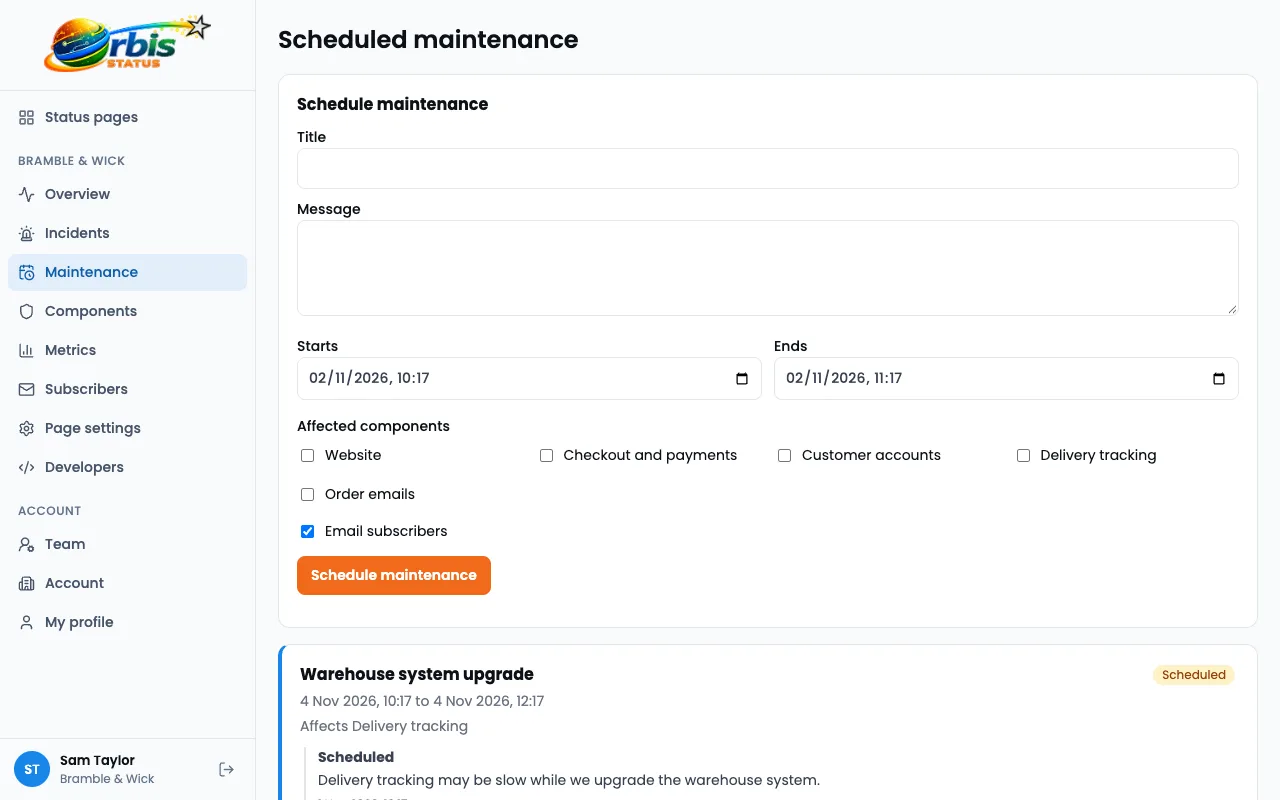
- Create a scheduled maintenance.
- Choose the components that will be affected.
- Set the start and end times.
- Write a short description in plain words.
- Save it.
What happens automatically
Scheduled maintenance starts and completes by itself at the times you set. While it is under way, the affected components show Under maintenance, and subscribers are notified by email. You do not need to remember to switch anything on or off.
Why maintenance does not hurt your uptime figures
The 90-day uptime bars treat Under maintenance as not down, so planned work does not count against a component, while a major outage counts as fully down.
Keep customers informed if it overruns
If the work is taking longer than planned, say so before the end time passes. Customers can forgive delays, but they find silence harder.
Afterwards
Check that every affected component is back to Operational. If something went wrong, post an incident in the usual way. See how scheduled maintenance works.
Try Orbis Status for free
- Free subdomain or domain
- Email, Slack and Teams updates
- No card required
Frequently asked questions
Are subscribers told about maintenance?
Yes. Scheduled maintenance notifies your email subscribers.
Do I have to start and finish it manually?
No. It starts and completes automatically at the times you set.