

Orbis Status does not monitor your systems. If you already use a monitoring tool, you can have it update your status page through the REST API. There are no one-click integrations with named monitoring tools, but any tool that can make a web request can do it.
What the API can do
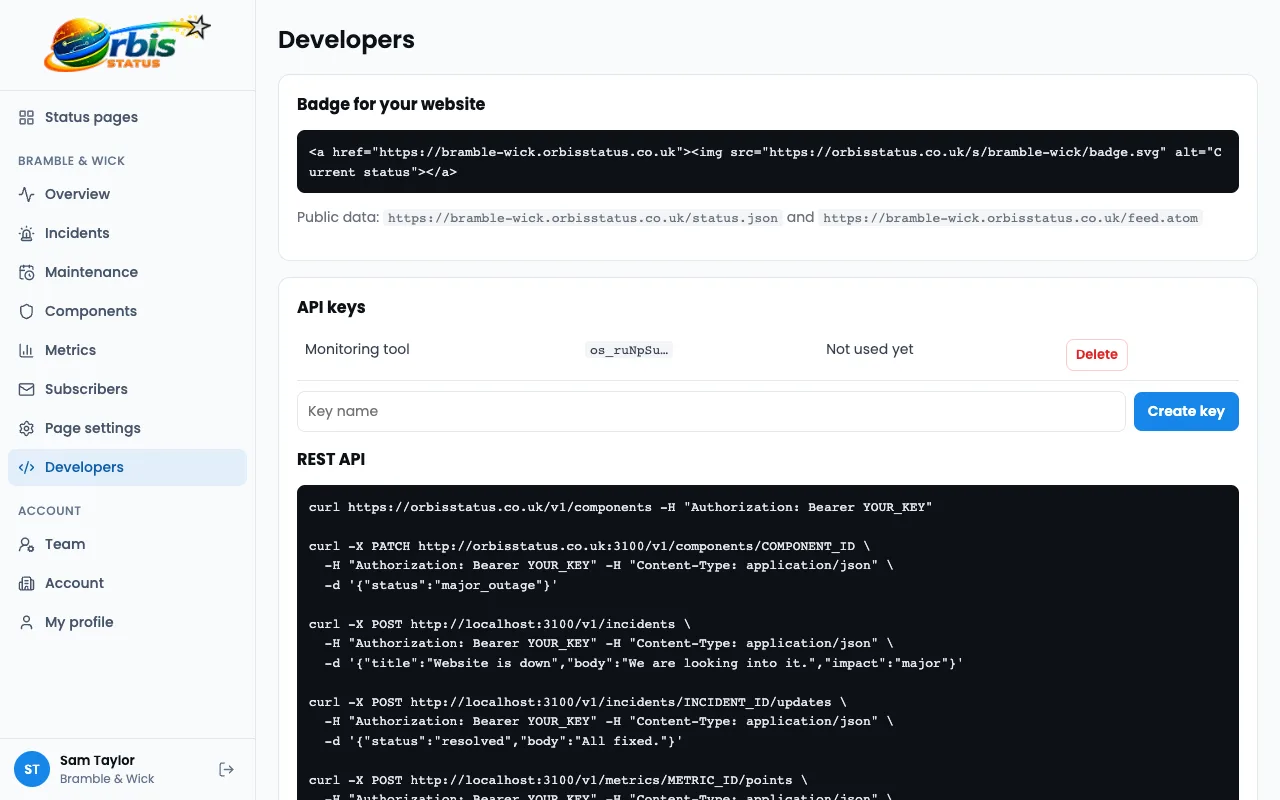
- Read the status of your components.
- Set the status of a component.
- Create incidents.
- Update incidents.
Create an API key
Open the developer settings for your status page and create an API key. Treat it like a password. Store it in your monitoring tool's secret settings, and never put it in a web page or public repository.
Decide what should happen automatically
It is tempting to automate everything, but a false alarm on a public page is awkward. Many teams let their tool set a component to Degraded performance, and ask a person to confirm before posting a Major outage.
Start small
- Pick one component and one check.
- When the check fails, call the API to set the component status.
- When it recovers, set the component back to Operational.
- Test it with a pretend failure before you rely on it.
Listen with webhooks
Webhooks work in the other direction. Orbis Status can send a signed request to your own system when an incident or component changes. Requests are signed with HMAC SHA-256, so check the signature before you trust one.
Keep a person in the loop
Automated updates are brief. Add a written incident update from your team so customers get context as well as a coloured dot. See how to automate with the API.
Try Orbis Status for free
- Free subdomain or domain
- Email, Slack and Teams updates
- No card required
Frequently asked questions
Does Orbis Status include uptime checks?
No. Use your own monitoring tool and connect it with the REST API or webhooks.
Are webhooks secure?
Webhooks are signed with HMAC SHA-256, so your system can check that a request really came from Orbis Status.