

During an incident, customers want to know three things: is it affecting me, are you working on it, and when will it be fixed. A good update answers those in a few short sentences.
Use the four stages
Each incident has a timeline of updates, and each update has one of four stages.
- Investigating: you know something is wrong and are looking into it.
- Identified: you know the cause and are working on a fix.
- Monitoring: a fix is in place and you are watching it.
- Resolved: it is fixed, and affected components go back to Operational.
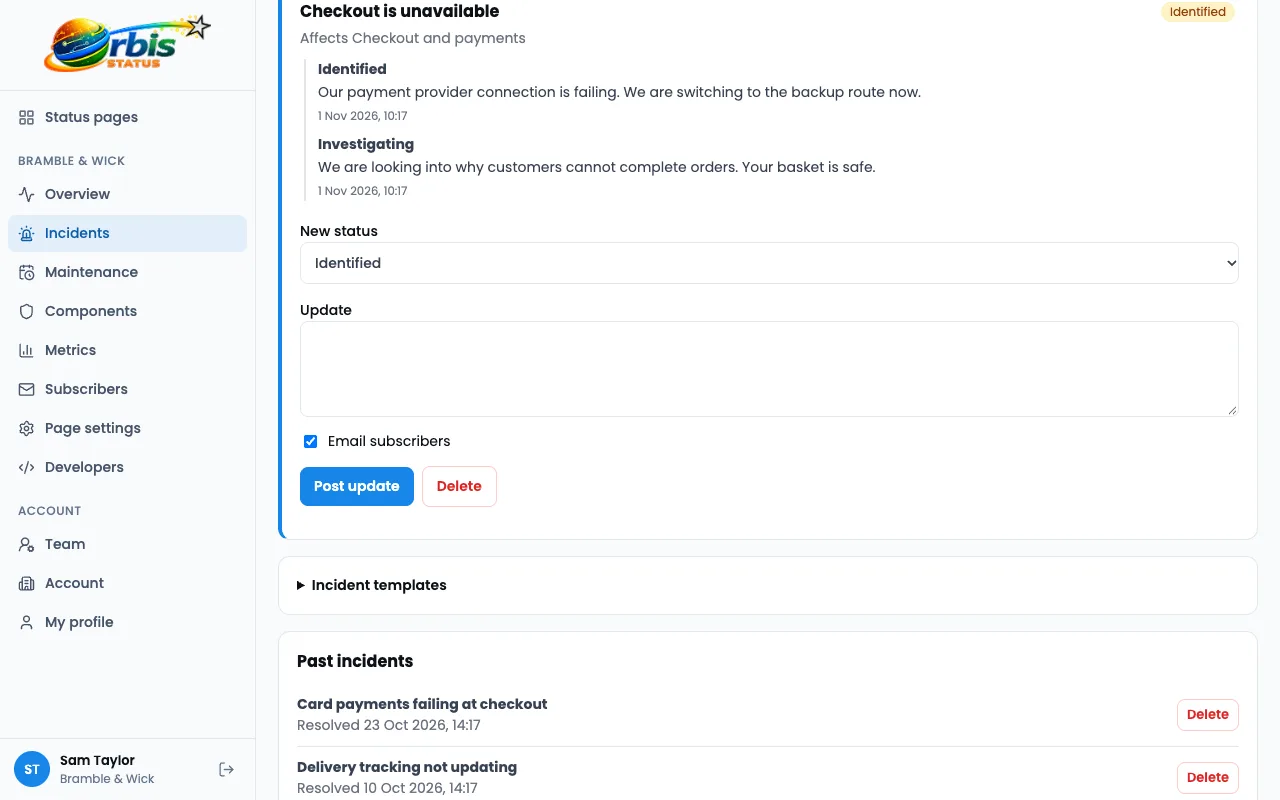
Set the impact honestly
Choose an impact of None, Minor, Major or Critical, and set the status of the components that are affected. Customers use these to decide whether they need to act, so do not play a problem down.
Write the way you speak
- Say what customers are seeing, not what your servers are doing.
- Keep it to a few sentences.
- Avoid internal jargon and ticket numbers.
- Say what customers should do, even if the answer is nothing.
- Say when the next update will come.
Compare the two
Too vague: "We are experiencing some issues." Better: "Some customers cannot log in. We are looking into it and will update you by 3pm."
Save wording you reuse
Incident templates are saved wording for common problems. Writing them calmly now means you are not drafting from scratch in the middle of a problem.

Keep updating, and close it properly
Post an update when something changes, and when you said you would. When it is fixed, resolve the incident. Subscribers are told by email, and the incident stays in your history for customers to read. Read what to say during an outage.
Try Orbis Status for free
- Free subdomain or domain
- Email, Slack and Teams updates
- No card required
Frequently asked questions
How often should I update?
Whenever something changes, and at the time you promised. If nothing has changed, a short update saying so is still worth posting.
Who is notified when I post an update?
Your email subscribers, any Slack or Teams channels you have connected, SMS subscribers on plans that include SMS, and anyone using your Atom feed or webhooks. The update also appears on your page.